Audience estimations
Overview
Audience estimations are preview metrics that get displayed while you’re defining an audience, so you can see its approximate reach and impact before using it in campaigns, personalizations or experiments.
Estimations are displayed at Audience entry-level, on the Editor tab, in the “Rule builder” section, and are updated automatically every time you change the audience rules, such as traits, filters or locations.
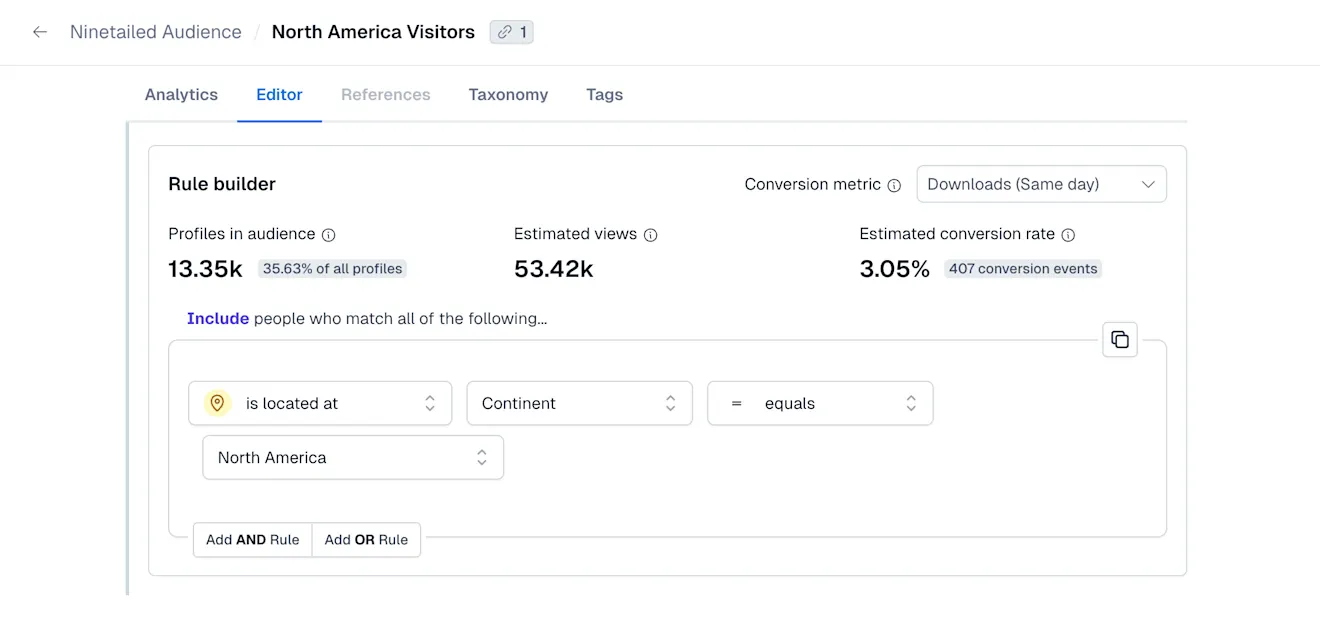
The following types of estimations are displayed:
Profiles in audience
Estimated views
Estimated conversion rate
Profiles in audience
The audience size represents the approximate number of unique profile IDs that match the audience definition. The value is calculated across track, identify, component, and page events.
You can use this estimation to understand whether you are targeting an audience that is too narrow or too broad.
Next to the estimated audience size, we also display the percentage of total monthly profiles this audience represents.
Estimated views
Represents the approximate number of component views generated by the profiles included in the audience definition.
Can be used to estimate the potential exposure of content or experiences targeted to this audience.
Estimated conversion rate
NOTE: The Estimated conversion rate value is only displayed once a conversion metric is selected.
Once a metric is selected, the estimated conversion rate is calculated as: Approximate unique number of converters ÷ number of profiles in the audience.
The unique number of converters is calculated using track events.
Use cases
Validate audience definitions before launching experiments or marketing campaigns.
Identify high-potential or underperforming audience segments.
Discover untapped segments worth targeting.
Verify that the audience setup is correct. For example, detecting typos, invalid parameters, or incomplete configurations.